See Wallarm's AI Control Platform In Action
Docker vs. containerd: Key Differences Explained
What is Docker? A Simple Explanation for Developers
Docker is embedded across software development and deployment pipelines.
Representative scenarios:
- Consistent dev environments across team machines using isolated containers.
- Parallel testing in CI pipelines using ephemeral services spun up on demand.
- Deployment of modular backends in microservice ecosystems.
- Encapsulation of legacy binaries in container shims for cloud compatibility.
- Cloud migrations relying on image portability across providers.
Infrastructure automation, reproducibility, and rollback-friendly deployment make Docker a standard in DevOps workflows.
Integration in Release Pipelines
In CI/CD pipelines, Docker streamlines testing, artifact delivery, and environment parity.
A typical process:
- Developer commits code to the source repository.
- CI service triggers a build job.
- Image is created via Dockerfile.
- Tests are performed in container instances.
- Approved image is pushed to registry.
- CD system deploys tagged image to target environments (QA, staging, or production).
This compartmentalized sequence enhances delivery confidence and facilitates faster iterations.
Working with Tags for Release Management
Docker images use version tags to distinguish builds. Consistent tag naming supports traceability and rollback.
Example tagging routine:
Avoid pushing mutable tags such as latest into production environments. Use semantic or date-based tags for stable deployments.
Docker Desktop vs Native Engine Installations
Desktop provides a comprehensive interface for sandbox experimentation. Docker Engine is optimized for headless deployment infrastructure.
What is containerd? Breaking Down the Lightweight Container Runtime
containerd Internal Structure
containerd operates as a modular container execution engine optimized for performance and integration in large-scale cloud-native environments. Written in Go and adhering to industry specifications, it separates key responsibilities into focused components that collaborate asynchronously to manage images, execute workloads, handle layered filesystems, and streamline process orchestration.
Core Components
- Persistent Daemon (
containerd)
Acts as the supervisory backend. Maintains image metadata, coordinates mounts using snapshot backends, tracks task state, and exposes services over gRPC. Operates in user space and remains idle unless actively servicing workloads. - Shim Layer
Launches with every container, remaining active post-start to serve as an intermediary between the container and the host system. Containers stay operational even ifcontainerditself exits or restarts. - Runtime Driver (runc by default)
Handles low-level interactions with the operating system. Uses UNIX primitives and Linux namespaces to create isolated process trees. Follows OCI Runtime Specification to remain compatible with alternate runtime class definitions. - gRPC Interface
Procedure calls are issued over gRPC sockets instead of REST APIs. Services like image operations, container lifecycle, task status, and snapshot management are exposed via strongly typed endpoints consumable by orchestrators or automation agents. - Layer Managers (Snapshotters)
Provide filesystem views from image layer diffs. Overlay implementations such asoverlayfsallow creating writable container roots with minimal disk I/O. Supports more advanced alternatives likebtrfsfor atomic snapshotting. - Blob Store (Content Addressed Storage)
Chunks image artifacts into deduplicated blobs. Index files, manifests, and layer tars are stored using digest identifiers. Guarantees image reproducibility and allows garbage collection of unused content. - Image API
Handles registry interaction, manifest parsing, unpacking, and layer verification. Maintains references, tags, and digests aligned with OCI image layouts. - Task Controller
Oversees creation, state transitions, and signal forwarding for running containers. Manages attach/detach, IO streaming, and retry logic through directly monitored process lifecycles.
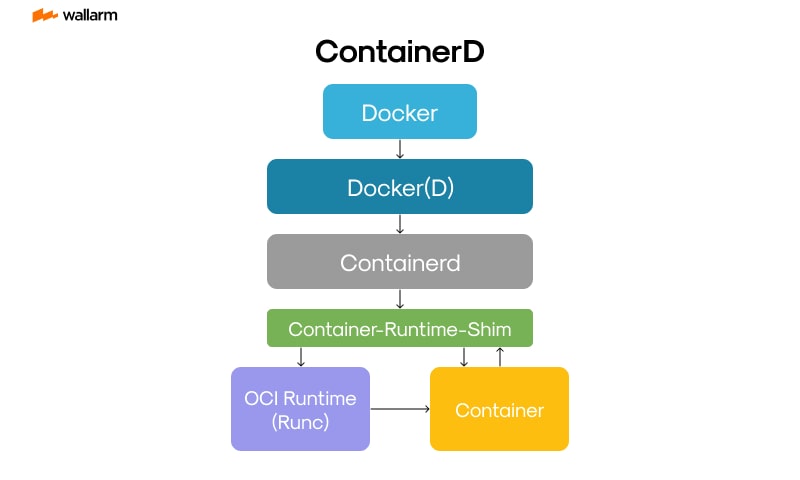
Feature Comparison: Docker vs containerd
Docker interfaces with users and orchestration tools, while containerd focuses purely on the lifecycle of OCI-compliant processes with minimal overhead.
Event Lifecycle: containerd Workflow
- Image Acquisition
OCI-compliant registries are contacted to download image artifacts—layers, manifests, and configs that are addressed via secure digests. - Filesystem Assembly
Using snapshotters (typically overlayfs), image diffs are applied into a mountable rootfs state. Layers are cached on disk for speed and re-use. - Container Specification Parsing
Image configs, environment variables, arguments, and resource limits form the task blueprint. Optionally, metadata is fetched or injected programmatically. - Process Launching
runc (or alternative) is triggered to establish the execution context within namespaces, cgroups, and a new PID tree via the containerd task handler. - Container Observation
Events such as termination, memory limits, or runtime errors are streamed to observers. Shim processes maintain logs and stdout/stderr channels. - Teardown and Metrics
When complete, volumes are unmounted, resources are freed, and logs or crash artifacts are optionally persisted or sent to telemetry collectors.
CLI Tools Supporting containerd
ctrBinary
Distributed with containerd primarily for developers and internal testing. Operates at the namespace level and is useful for scripting or ephemeral workloads.
crictlUtility
Designed by Kubernetes SIG-Node to interact with CRI-compliant backends. Enables inspection, logs, runtime state, and image management from within Kubernetes nodes.
These tools work independently from Docker’s CLI, enabling fine-grained control directly over containerd or Kubernetes runtimes.
Compatibility with OCI Standards
containerd supports both OCI Image and Runtime standards through strict adherence to defined schemas. Images are interpreted using ANSI configurations and guarantees interoperability with third-party registries, builders, and alternative executors.
Containers are launched via runtime-spec bundles, and execution contexts are built using kernel primitives defined in the OCI lifecycle: mounts, capabilities, seccomp, and namespace separation are all respected consistently.
Real-World Usage Domains
- Default Kubernetes Backend
Major Kubernetes distributions (AKS, EKS, GKE) use containerd via the CRI plugin to launch workloads. Works directly with kubelet and supports PodSandbox and container abstraction layers. - Continuous Integration Environments
Integrated into build pipelines and artifact promotion tools where consistency and reproducibility matter. Alternates between dev and prod runtime classes efficiently. - Resource-Limited Hardware
Ideal for IoT and edge nodes where memory budget is tight. Operates containers in <50MB memory with zero required processes at idle. - Functions-Based Servers
Serves as base for systems like Knative's container launchers and OpenFaaS where concurrency scaling, startup time, and security boundaries are critical.
Kubernetes Integration: CRI Implementation
containerd offers out-of-the-box compliance with Kubernetes Container Runtime Interface (io.containerd.grpc.v1.cri). Pod life and image handling are mapped to containerd lifecycle management using protobuffer definitions and containerd’s internal task/plugin system.
CRI Support Includes:
- Private registry authentication via image pull secrets
- Pod sandbox creation and teardown
- Namespace and cgroup allocations (v1 and v2 compatibility)
- RuntimeClass mapping into alternate isolation layers
- Log stream access via container IO redirection
- Default network plugin compatibility (CNI)
containerd messages propagate status and metrics into kubelet and Kubernetes control plane using CRI-conformant responses.
Snapshotter Options
Filesystem snapshots define how the image root is presented to live containers. Systems plug in custom handlers for different file systems.
- overlayfs — Most common; uses kernel overlay mount.
- btrfs — Adds advanced features: inline compression and subvolume rollbacks.
- zfs — Offers transactional mount points with error correction and pool-based management.
- native — Basic handler for flat filesystems with no layering; mainly for testing.
Efficiently packages image data on disk, avoids duplication, and accelerates workload spin-up.
Modular Extension via Plugin System
containerd plugins inject behavior into nearly every subsystem:
- Runtime handlers (
gVisor,Firecracker,Kata) - Custom snapshotters with vendor-specific volume logic
- Logging adaptors streaming to journald or syslog
- Monitoring overlays for OpenTelemetry or Prometheus
- Signed content policies with admission plugins
Configuration files (TOML) declare plugin loading and runtime-scoped selection. Go-native SDKs power most plugin implementations.
Security Capabilities
containerd integrates deep with Linux security primitives:
- Namespaces — Enforced per-process isolation for filesystem, hostname, network, IPC, and UIDs.
- Control Groups — Limits CPU, memory, IO bandwidth across containers to avoid contention.
- Seccomp — Tailored syscall filters restrict process behavior, configurable per runtime.
- AppArmor & SELinux — Enforces Mandatory Access Controls when enabled by the host.
- Image Trust Policies — Chains of trust validate image authenticity using sigstore, Notary, or local signatures.
SecurityConfigs can be assigned automatically by Kubernetes or manually through containerd’s task definitions.
Resource Usage and Runtime Performance
containerd demonstrates low operational footprint and fast response times when compared to Docker-backed environments.
Large-scale clusters, virtualized CI/CD builders, and performance-bound edge nodes benefit directly from containerd’s minimalist resource consumption.
Supported Runtimes Beyond runc
Alternate sandboxed or virtualized runtimes configured through plugin interfaces offer workload isolation enhancements:
- gVisor — System call interception in userspace; ideal for multitenant security zones.
- Firecracker — Rapid-launch microVMs with snapshot booting and constrained kernel access.
- Kata Containers — Launches full Linux kernels per container using lightweight VMs.
Runtimes registered in containerd config are selectable by Kubernetes RuntimeClass or via container options.
Configuration Reference
Central configuration file: /etc/containerd/config.toml
Example runtime selection:
Other configuration entries manage plugin registration, service endpoints, garbage collection parameters, and logging schema. Runtime configuration changes take effect upon daemon restart.
The Modern Container Ecosystem: Understanding Their Roles
Core Components of the Modern Container Ecosystem
The container ecosystem has evolved into a complex yet highly efficient system that powers modern DevOps workflows. It consists of several key components, each with a specific role. Understanding how these parts interact is essential for developers, DevOps engineers, and security professionals.
1. Container Runtimes
Container runtimes are the engines that run containers. They are responsible for creating, starting, stopping, and deleting containers. Two of the most well-known runtimes are Docker and containerd. While Docker was once the default runtime for most containerized applications, containerd has emerged as a lightweight and Kubernetes-native alternative.
There are two types of runtimes:
- High-level runtimes: These provide user-friendly interfaces and additional features. Docker is a prime example.
- Low-level runtimes: These are closer to the kernel and handle the actual container execution. containerd and CRI-O fall into this category.
2. Container Orchestrators
Orchestrators manage clusters of containers across multiple hosts. They handle scheduling, scaling, networking, and failover. Kubernetes is the dominant orchestrator in the ecosystem today.
Key features of orchestrators include:
- Service discovery and load balancing
- Automated rollouts and rollbacks
- Self-healing (restarting failed containers)
- Secret and configuration management
Kubernetes uses container runtimes like containerd to run containers on each node. It communicates with the runtime through the Container Runtime Interface (CRI).
3. Image Builders and Registries
Containers are built from images. These images are created using tools like Docker or Buildah and stored in registries such as Docker Hub, Amazon ECR, or Google Container Registry.
- Image builders: Convert application code and dependencies into container images.
- Registries: Store and distribute container images.
Example Dockerfile:
This Dockerfile creates a lightweight Node.js container image. Once built, it can be pushed to a registry and pulled by any orchestrator or runtime.
4. Networking and Service Meshes
Containers need to communicate with each other and with external systems. Container networking is handled by tools like CNI (Container Network Interface) plugins, which Kubernetes uses to manage pod networking.
Service meshes like Istio or Linkerd add advanced networking features:
- Traffic routing
- Load balancing
- Observability
- Security (mTLS)
These tools operate at the network layer and are essential in microservices architectures.
5. Storage and Volumes
Containers are ephemeral by design, meaning their data is lost when they stop. Persistent storage is managed through volumes and storage plugins.
Types of storage:
- Ephemeral storage: Temporary, tied to container lifecycle.
- Persistent volumes: Managed by Kubernetes, backed by cloud or on-prem storage.
- Shared volumes: Allow multiple containers to access the same data.
Example Kubernetes volume configuration:
This YAML file mounts a persistent volume into a container, ensuring data survives pod restarts.
6. Monitoring and Logging
Observability is critical in containerized environments. Tools like Prometheus, Grafana, Fluentd, and ELK stack (Elasticsearch, Logstash, Kibana) are widely used.
- Monitoring: Tracks metrics like CPU, memory, and network usage.
- Logging: Captures stdout/stderr from containers and stores logs centrally.
- Tracing: Helps trace requests across microservices (e.g., Jaeger, Zipkin).
These tools integrate with Kubernetes and container runtimes to provide real-time insights into application performance.
7. Security Layers
Security in the container ecosystem is multi-layered. It includes:
- Image scanning: Detect vulnerabilities in container images.
- Runtime security: Monitor container behavior for anomalies.
- Network policies: Control traffic between pods.
- Secrets management: Securely store API keys, passwords, and tokens.
Popular tools:
- Aqua Security
- Sysdig Secure
- Falco
- Vault by HashiCorp
Security must be integrated at every stage of the container lifecycle—from image creation to runtime.
How Each Component Interacts
The modern container ecosystem is not a set of isolated tools. Instead, it’s a tightly integrated system where each component plays a role in the application lifecycle.
Example Workflow:
- Developer writes code and creates a Dockerfile.
- Image is built using Docker or Buildah.
- Image is pushed to a registry like Docker Hub.
- Kubernetes pulls the image and schedules it on a node.
- containerd runs the container on the node.
- CNI plugin configures networking for the pod.
- Persistent volume is mounted if needed.
- Service mesh handles traffic between services.
- Monitoring and logging tools collect data.
- Security tools scan and monitor the container.
This workflow shows how deeply interconnected the ecosystem is.
Comparison of Key Ecosystem Tools
Each of these tools has a specific role, but they must work together seamlessly to support scalable, secure, and efficient containerized applications.
Real-World Use Case: Microservices Deployment
Consider a company deploying a microservices-based e-commerce platform. Each service (e.g., cart, payment, inventory) is packaged in a container.
- Docker is used to build the images.
- Images are stored in a private registry.
- Kubernetes orchestrates the deployment.
- containerd runs the containers on each node.
- Istio manages service-to-service communication.
- Prometheus and Grafana monitor performance.
- Vault stores API keys and credentials.
- Falco watches for suspicious activity.
This setup allows the company to deploy updates quickly, scale services independently, and maintain strong security controls.
CRI and OCI: Standards That Glue It All Together
Two important standards ensure interoperability in the container ecosystem:
- CRI (Container Runtime Interface): Defines how Kubernetes communicates with container runtimes like containerd or CRI-O.
- OCI (Open Container Initiative): Sets standards for container image formats and runtimes.
These standards allow developers to mix and match tools without vendor lock-in.
Example CRI interaction:
This chain shows how a Kubernetes pod request eventually results in a running container.
Lightweight vs Full-Featured Runtimes
The choice between Docker and containerd often comes down to use case.
containerd is preferred in Kubernetes environments due to its lightweight nature and direct CRI support. Docker is still useful for local development and CI pipelines.
Summary of Roles in the Ecosystem
- Docker: Developer-friendly tool for building and running containers.
- containerd: Efficient runtime for production environments.
- Kubernetes: Orchestrates containerized workloads.
- CNI/CSI: Handle networking and storage.
- Monitoring/Logging: Provide observability.
- Security tools: Protect the entire stack.
Each component is essential. Together, they form a resilient, scalable, and secure container ecosystem that supports modern application development and deployment.
Docker vs containerd: A Head-to-Head Comparison
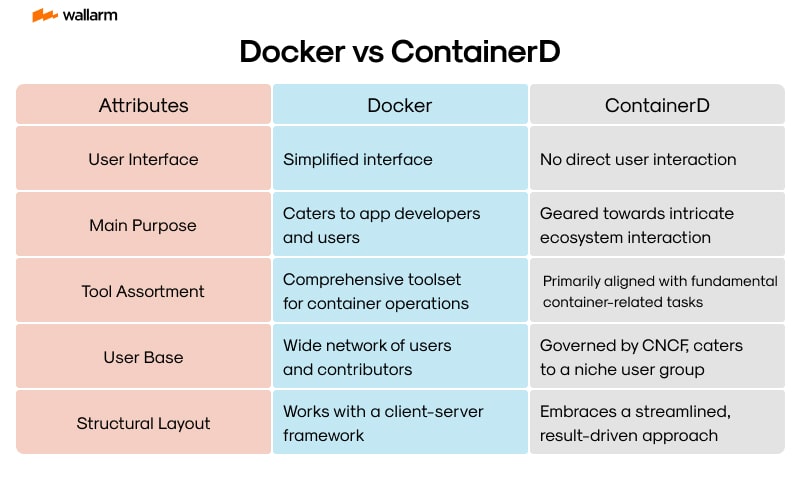
Architecture and Internal Design
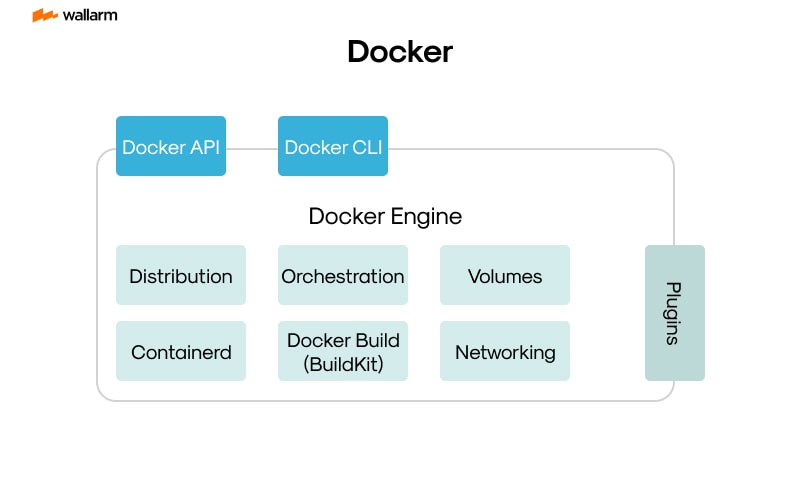
Docker offers an all-encompassing environment to handle container workflows—from container creation to runtime management and networking configuration. Its structure favors developers working through local tools, focusing on ease of use and interactive debugging. Meanwhile, containerd streamlines execution and lifecycle management of containers, favoring production-scale workloads with tight integration into control-layer systems like Kubernetes.
Docker Technical Layers:
- Command Interface (CLI): Tools like
docker run,docker build, anddocker-composeorchestrate container tasks and setups. - Background Daemon:
dockerdhandles local state, container metadata, and image management over an HTTP-based API surface. - Image Generation Stack: Relies on BuildKit to transform file-based instructions into immutable container images.
- Execution Chain: container launches move from docker’s interface through containerd, and finally reach runc, which manages the actual system processes.
containerd Technical Layers:
- Daemon Engine: Monitors and controls container creation, teardown, and snapshot history.
- Shim Manager: Resides between containerd and user processes to allow container continuation even if containerd crashes or restarts.
- Low-Level Runtime: Relies on runc for spinning up containers using the Open Container Initiative (OCI) standards.
- Modular Extensions: Embeds pluggable components for layer caching, filesystem management, and remote image retrieval.
Performance and Resource Behavior
containerd avoids bundling tools unrelated to direct container creation and execution, resulting in a slimmer memory and CPU profile. Docker, by incorporating developer-facing utilities, maintains more active subsystems and consumes higher system resources during idle and runtime states.
Memory Footprint:
- Docker assigns memory to several services such as network drivers, the image builder, and API responders.
- containerd maintains a single runtime binary and offloads build responsibilities, keeping memory usage consistently low.
Start Time Comparison:
- containerd reaches ready-state almost instantly after system startup.
- Docker initializes step by step, loading additional services like volume tracking and image relay processes before becoming responsive.
Resource Isolation Controls:
Both runtimes rely on Linux namespaces, cgroups, and capability sets. containerd allows Kubernetes-native governance to enforce pod limits and security controls on a per-node basis.
Execution Security and Isolation Model
Docker builds in extended feature sets, contributing to a broader range of running services and listener interfaces. This design increases the potential for misconfiguration. containerd stays within strict runtime roles and has fewer background ports and daemons, minimizing threat exposure.
Docker Characteristics:
- Often runs as root unless explicitly configured otherwise using rootless mode.
- Direct access to the Docker socket can provide system-level access rights if improperly secured.
- Larger list of built-in commands can expand available attack vectors.
containerd Characteristics:
- Runs with minimal surface area when deployed under orchestrators such as Kubernetes.
- Offers default support for various Linux kernel security policies, including seccomp filtering and AppArmor profiles.
- Every function remains bounded to runtime enforcement; lacks higher-level tools that could present privilege escalation paths.
Image Handling and Transfer Procedures
Docker directly supports writing instructions, assembling images, caching builds, and managing registry uploads without depending on external software. containerd offloads everything related to image creation and only focuses on IM interaction, decompression, and local snapshotting.
Docker Image Operations:
- Builds container packages from Dockerfiles using its own BuildKit manager.
- Pushes artifacts to image registries including Docker Hub or private endpoints.
- Pulls and unpacks layers directly from public and private registries.
containerd Image Operations:
- Requires another build engine like Kaniko or Buildah to prepare images beforehand.
- Fetches and stores layers as snapshots using pluggable filesystem drivers like fuse-overlay or overlayfs.
- Interfaces with any compliant OCI registry during orchestration runtime pull.
Kubernetes Runtime Integration
containerd implements Kubernetes's Container Runtime Interface (CRI) without translation proxies. Its limited scope means quicker lifecycle transitions from pod registration to container startup. Docker previously needed dockershim for CRI compatibility, which added latency and complexity.
Kubernetes with containerd:
- Reads pod manifests directly from kubelet over gRPC.
- Bypasses need for translation layers between orchestration and runtime.
- Applied policies for syscall filtering, filesystem mounts, and process limits come directly from Kubernetes definitions.
Kubernetes with Docker (Before Deprecation):
- dockershim converted Kubernetes CRI calls into Docker-specific commands.
- Added intermediate translation layer that introduced maintenance concerns and divergence in spec handling.
- Removed entirely from Kubernetes 1.24 onward due to its incompatibility with future long-term orchestration goals.
Developer-Facing Tools and Interaction Methods
Docker maintains a tool-rich environment focused on command-line operations, local testing, and rapid prototyping. It supports multi-container setups with human-friendly config files and ships with default logging and network drivers. containerd lacks these higher-level abstractions and is primarily used under external orchestrators.
Docker CLI Usability:
- Common flags allow environment variable injection, health checks, user control, and mount setting in single commands.
- Compose system enables grouped service definitions defined in declarative YAML.
- Large ecosystem of plugins and visualizers supplement functionality for developers.
containerd CLI Purpose:
- Meant strictly for debugging or manual interaction.
- Lacks abstraction for tasks like service grouping or environment emulation.
- Functions like pulling or starting containers require more detailed knowledge of image names and command structure.
Deployment Use Case Differentiation
Docker provides an accessible container environment for standalone applications, testing, and development pipelines. containerd supports scalable cloud-native infrastructure, enabling low-resource operation for large-scale orchestrators and multi-tenant environments.
Docker Usage Patterns:
- Fits local workstations where developers test containers on their laptops.
- Proxies container images through CI platforms for QA and publishing.
- Builds and pushes test harnesses for integration environments.
containerd Usage Patterns:
- Serves as the foundational layer in managed Kubernetes clusters.
- Executes optimized containers at scale across nodes with minimal runtime overhead.
- Functions effectively within tightly-governed enterprise networks and hyper-converged systems.
Integration Ecosystem and Development Community
Docker remains familiar and widely used due to its approachable UX and early dominance in container engineering. containerd, shaped under the CNCF contributions model, targets runtime efficiency, consistency, and compliance with emerging standards in container runtime governance.
How containerd Works: Kubernetes Integration Explained
Kubernetes Integration with containerd: Execution Flow and System Layout
Kubelet communicates with the container runtime using the CRI protocol over gRPC. This interaction invokes a native CRI plugin embedded in containerd, which directly interprets kubelet’s requests and activates internal operations. These operations call runtime executables such as runc, interfacing with Linux container primitives following OCI specifications.
Pod specs handled by Kubelet are translated into sequential container setup actions: fetching container images, setting up resource configurations, initializing process environments, and wrapping containers in execution sandboxes. containerd fulfills each lifecycle stage internally without depending on Docker’s legacy integration model.
gRPC Flow within CRI and containerd Runtime
Kubelet sends execution commands such as RunPodSandbox, CreateContainer, and RemoveContainer over a gRPC stream. On receiving one of these calls, containerd:
- Interprets and verifies the protobuf request definitions.
- Uses its pull client to retrieve images via remote registries or local cache.
- Writes configuration files for an OCI bundle under a runtime-specific directory.
- Applies control group parameters, Linux namespaces, and seccomp options.
- Sends status feedback to Kubelet through structured metadata objects.
The runtime server inside containerd uses dedicated goroutines and isolates CRI handling from daemon logic to minimize cross-impact during failures.
containerd vs Docker: Node Runtime Architecture Breakdown
containerd eliminates Docker’s proxy layers and directly processes image and container logic via CRI.
containerd Execution Namespaces
containerd reserves environment-specific namespaces to isolate user groups and logical tenants. All Kubernetes-driven containers operate inside the k8s.ionamespace, separating their internal images and runtime data from containers run locally or via external direct access.
Sample terminal output showing namespace segmentation:
These boundaries ensure platform workflows remain isolated and unaffected by manual container spawns or administrative shell sessions.
Shim-Based Lifecycle Isolation
Each new container launch spawns a lightweight shim process that persists independently of the core containerd daemon. The shim is responsible for:
- Maintaining runtime state even if containerd crashes or is restarted.
- Relaying streams like stdout and stderr so that logs remain accessible for Kubelet or logging systems.
- Monitoring process termination and reporting exit details to containerd.
The shim process forks early and detaches from the main binary, maintaining a 1:1 association with its managed container. Once active, this mechanism allows the container to run even if the parent management daemon is stopped or restarted.
Image Management via containerd Internals
containerd’s image service interprets pull operations either from Kubernetes CRI requests or CLI instructions like ctr images pull. All image layers are stored and unpacked inside the namespace-specific content store and mounted using snapshotter plugins.
Example pull command within Kubernetes namespace:
Supported mount backends include overlayfs by default, but others like btrfs (for volume copy-on-write) or stargz (for lazy fetch) can be enabled per configuration basis for performance tweaks.
Snapshotter behavior and caching strategy are dictated in the TOML config under the containerd plugin sections.
Container Logging Paths and External Forwarders
containerd does not store logs by itself. Instead, logs are redirected to conventional paths for external agents to forward. Kubernetes presets log locations in the filesystem:
Agents such as FluentBit, Vector, or Filebeat monitor these logs and push structured events to destinations like Loki, Elasticsearch, or Grafana backends. Log rotation and truncation are managed by kubelet and CRI logic.
Metrics on image pulls or container readiness can be enabled by defining a metrics endpoint in the containerd configuration:
After configuration, service must be restarted using:
Pod Networking via CNI Interactions
containerd delegates network setup during sandbox provisioning to external CNI binaries. This happens before any user container launches.
Pod sandbox setup initiates CNI plugin execution with:
- IP address assignment.
- Bridge creation or overlay mesh linking.
- DNS resolution injection into
/etc/resolv.conf.
CNI configuration files stored in /etc/cni/net.d/ call specific plugins such as:
calico– applies policies with IP encapsulation and BGP routing.flannel– provisions simple underlay bridge-based networking.cilium– uses eBPF to define kernel-level service visibility control.
Once networking is complete, containerd invokes the user containers in that net namespace.
Enforcing Runtime Security Parameters per Pod
Kubernetes maps securityContext attributes into low-level runtime specs. When containerd prepares an OCI bundle, it embeds these values from the CRI request:
- Drops Linux capabilities to restrict privileged syscalls.
- Assigns user and group IDs to change process ownership.
- Sets root filesystem as read-only to limit write attack possibilities.
- Applies seccomp profiles to constrain syscall usage.
Example pod security setup:
During container launch, runc applies corresponding entries into OCI JSON files such as capability sets, and seccomp action lists. These map to kernel CGroup policies and clone() namespace requests during process instantiation.
RuntimeClass Selection for Sandboxed Environments
containerd supports multiple runtime backends configured with their own adapters. Kubernetes defines the association using RuntimeClass, allowing pods to explicitly target a secured or GPU-based execution pathway.
Example declaration for gVisor:
Configuration block inside containerd:
This mapping ensures all related pods use the runsc binary, segfault-trapped user-space kernel for higher isolation against system calls—ideal for defensive computing or multitenancy workloads.
containerd Runtime Configuration
Administrative options are housed in /etc/containerd/config.toml. Changes to how images are pulled, shims are activated, or metrics are served happen here.
Example tuning block:
Generate default file:
Apply edits:
Snapshot-level tuning, log capabilities, and runtime selection all rely on this configuration's structure.
Containerized Databases and Specific Considerations
Security Challenges and Defense Strategies for Databases in Containers
Deploying stateful systems like databases in containers introduces persistent storage, access control, and operational challenges. Unlike ephemeral microservices, container-stored databases require additional layers of security due to their long-lived state and direct exposure to critical workloads.
Frequent Security Pitfalls Encountered in Container-Based Database Environments
- Unsafe Base Images: Using containers sourced from unverified or outdated registries introduces exploitable bugs and malware.
- Public Exposure of Services: Opening database services to all network interfaces without segmentation allows attackers to scan and access them externally.
- Weak Credential Handling: Retaining default usernames and passwords or transmitting credentials without encryption increases risk of compromise.
- Host Volume Abuse: Permitting containers to write unchecked to host-mounted volumes can lead to lateral movement or elevation of privileges.
- Unrestricted Resource Consumption: Lack of quota enforcement allows attackers to stress CPU and memory, ultimately leading to denial-of-service incidents.
- Unmanaged Sensitive Data: Storing secrets unsafely within configuration files or exposed environment variables makes them easy targets for exfiltration.
Defensive Techniques Categorized by Component
Image Hygiene
- Pull only publisher-verified or cryptographically signed images from secure registries.
- Automate scanning of every image layer via Grype, Snyk, or similar vulnerability scanners.
- Exclude development tools and compilers.
- Apply multi-phase Dockerfile builds, isolating toolchains from runtime binaries.
Traffic Control and Isolation
- Define Kubernetes network rules to throttle inbound/outbound connections specific to each pod.
- Eliminate NodePort usage for database services; expose only within a private cluster.
- Wrap client-server communication in TLS with mutual certificate validation.
- Enforce firewall policies external to the cluster to limit entry points.
Identity and Access Layers
- Purge built-in credentials and rotate generated passwords before use.
- Lock down access per user or role with fine-grained privileges through Postgres or MySQL roles.
- Use identity providers with authentication delegation through OpenID Connect or LDAP integration.
- Monitor permission changes and login attempts with forensic-grade tracking.
Securing Database Storage
- Use provider-backed encrypted block storage with mounted volumes for persistence.
- Schedule frequent backups stored in WORM object stores or off-site secure locations.
- Set group and user ownership at directory and file level within containers.
- Store credentials securely using tools like HashiCorp Vault or SOPS instead of environment variables.
In-Flight and Runtime Controls
- Apply cgroup-enforced CPU and RAM ceilings in manifests using constraints like
resources.limits.memory. - Drop root privileges by setting UID and GID in container specs.
- Apply seccomp or AppArmor to prevent access to unnecessary Linux syscalls.
- Inspect container activity using eBPF-powered runtime monitors such as Cilium Tetragon or Falco.
Side-by-Side Comparison: Legacy vs. Containerized Database Security
PostgreSQL Configuration in Kubernetes: Secure Specification Example
This PostgreSQL deployment enforces:
- Isolation through non-root privilege and filesystem immutability.
- Segregated runtime access using Kubernetes-managed secrets.
- Durable block storage that persists across pod replacements.
Evaluating Runtime Engines: Docker and containerd in Comparison
For hardened security environments, containerd’s modular build excels by minimizing moving parts, while Docker’s monolith can increase attack exposure.
Principles for Protecting Secrets in Container Workloads
Must-Do Practices:
- Inject secrets at runtime from ephemeral storage backends.
- Encrypt credentials stored at the storage level on disk.
- Rotate sensitive information automatically using CI/CD pipelines or secret management tools.
- Scope retrieval policies based on least-privilege access.
Avoid at All Costs:
- Committing secrets into code repositories under version control.
- Defining clear-text secrets directly in Kubernetes YAML or Docker Compose files.
- Sharing one hardcoded token between multiple containers.
- Using long-lifetime secrets without expiry or rotation.
Attack Patterns and Specific Prevention Techniques
Open Database Porting
Error: Pod spec exposes 5432 to an external IP with no firewall rule.
Threat: Port scans followed by brute-force login attempts.
Fix Steps:
- Apply NetworkPolicy to restrict ingress to only known internal source pods.
- Remove public access via LoadBalancer or hostPort unless explicitly whitelisted.
- Set
requireSSL=truein database config.
Vulnerable Image Usage
Error: Run image mysql:5.7 without verification or scanning.
Threat: Known CVEs or embedded exploits inside layers.
Fix Steps:
- Fetch from signed repositories or BSI-compliant registries.
- Schedule nightly CVE scans and alert on new findings.
- Use repository update tags to trigger new builds during vulnerability disclosure.
Dangerous Directories Mounted
Error: Volume mount from /home/hostuser with read-write access.
Threat: Manipulation of host files to gain elevated privilege or disrupt host.
Fix Steps:
- Avoid
hostPathunless absolutely required. - Prefer Kubernetes-backed PVCs with defined access modes.
- Add readOnly flag where write is not needed.
Visibility and Auditing Techniques for Container-Based Databases
Collection and analysis must factor in the container environment context.
Recommended Tech Stack:
- Prometheus for cluster and DB health metrics.
- Falco rules intercept suspicious syscalls inside containers.
- OpenTelemetry for distributed traces across pods.
- Auditd or BPFTrace to capture kernel activity.
Critical Events to Track:
- Authorization errors or unexpected user logins.
- Database error spikes that signal injection or reconnaissance.
- Consistent querying from unknown IP ranges.
- Container restart frequency or OOM (out-of-memory) kills.
- Write attempts on sensitive system partitions.
Important Rules for Logging in Containers
- Redirect both application and database logs to sidecar log agents like Fluent Bit.
- Remove sensitive tokens and credentials from logs at source or receiver filter stage.
- Stream log data to secure aggregation points with controlled access such as Elastic, Loki, or Graylog.
- Set log retention based on compliance rulebooks like GDPR or HIPAA.
- Timestamp and sign logs for integrity checking during audits or incident response.
Future Trends in Containerized Environments
Serverless Containers: The Rise of Function-as-a-Service (FaaS)
The evolution of containerized environments is moving toward serverless computing. This model allows developers to deploy code in the form of functions without managing the underlying infrastructure. Serverless containers combine the flexibility of containers with the simplicity of serverless architecture.
In this model, containers are spun up on-demand to execute a function and then shut down automatically. This reduces resource consumption and operational overhead. Platforms like AWS Fargate, Google Cloud Run, and Azure Container Apps are leading this shift.
Key Benefits of Serverless Containers:
- Auto-scaling: Containers scale automatically based on demand.
- Cost-efficiency: You only pay for the compute time used.
- Faster deployment: Developers can focus on writing code, not managing infrastructure.
Example: Deploying a Serverless Container on Google Cloud Run
This command deploys a containerized application without provisioning any servers.
MicroVMs and Lightweight Virtualization
MicroVMs are emerging as a secure and efficient alternative to traditional containers. Technologies like Firecracker (developed by AWS) and Kata Containers provide the isolation of virtual machines with the speed of containers.
Comparison: Containers vs MicroVMs
MicroVMs are especially useful in multi-tenant environments where security boundaries must be strictly enforced. They offer better isolation by using hardware virtualization, making them ideal for running untrusted code.
AI and Machine Learning Workloads in Containers
As AI and machine learning become more mainstream, containerized environments are adapting to support GPU workloads and distributed training. Kubernetes now supports device plugins that allow containers to access GPUs and other specialized hardware.
Challenges in Containerizing AI Workloads:
- Large model sizes: Containers must be optimized to handle large ML models.
- GPU scheduling: Efficiently allocating GPU resources across pods.
- Data locality: Ensuring data is close to the compute resources.
Kubernetes YAML Example for GPU Workload:
This pod requests one NVIDIA GPU for running machine learning tasks.
Edge Computing and Containerization
Edge computing is pushing containerized workloads closer to the user. Instead of relying on centralized cloud data centers, containers are now being deployed on edge devices like IoT gateways, routers, and even drones.
Why Containers Fit Edge Computing:
- Lightweight: Containers have a small footprint, ideal for resource-constrained devices.
- Portability: They can run consistently across different hardware.
- Fast updates: Rolling out updates to edge devices becomes easier.
Use Cases:
- Real-time analytics on factory floors
- Video processing on surveillance cameras
- Local AI inference on smart devices
Edge Container Orchestration Tools:
Immutable Infrastructure and GitOps
Immutable infrastructure is becoming a standard in containerized environments. Instead of patching live systems, entire containers are rebuilt and redeployed. This ensures consistency and reduces configuration drift.
GitOps takes this a step further by using Git repositories as the source of truth for infrastructure and application deployments. Tools like ArgoCD and Flux automate the deployment process based on Git commits.
GitOps Workflow:
- Developer pushes code to Git.
- CI pipeline builds and pushes container image.
- GitOps tool detects change and updates Kubernetes manifests.
- Kubernetes applies the new configuration.
Benefits:
- Auditability: Every change is tracked in Git.
- Rollback: Reverting to a previous state is as simple as a Git revert.
- Automation: Reduces manual intervention and human error.
Confidential Containers and Zero Trust Security
Security is a growing concern in containerized environments. Confidential containers aim to protect data in use by leveraging hardware-based Trusted Execution Environments (TEEs). These containers encrypt memory and isolate workloads even from the host OS.
Zero Trust Principles in Containers:
- Never trust, always verify: Every request is authenticated and authorized.
- Least privilege: Containers run with minimal permissions.
- Micro-segmentation: Network policies isolate workloads.
Security Enhancements in Future Container Runtimes:
Multi-Cloud and Hybrid Deployments
Organizations are moving toward multi-cloud and hybrid cloud strategies to avoid vendor lock-in and improve resilience. Container orchestration tools are evolving to support seamless deployment across different cloud providers and on-premise environments.
Key Technologies:
- Anthos (Google): Manages Kubernetes clusters across clouds.
- Azure Arc: Extends Azure services to any infrastructure.
- Rancher: Centralized management for multi-cluster Kubernetes.
Challenges:
- Networking: Ensuring consistent network policies across environments.
- Storage: Managing persistent volumes across clouds.
- Compliance: Meeting regulatory requirements in multiple regions.
Multi-Cloud Deployment Example:
This service can be deployed across clusters in different cloud providers using federation.
WASM and the Future of Lightweight Workloads
WebAssembly (WASM) is gaining traction as a lightweight alternative to containers for certain workloads. WASM modules are sandboxed, portable, and can run in browsers, edge devices, or servers.
Why WASM Matters:
- Security: Strong sandboxing model.
- Speed: Near-native performance.
- Portability: Runs on any platform with a WASM runtime.
Comparison: Containers vs WASM
WASM is not a replacement for containers but complements them in scenarios where ultra-fast startup and minimal resource usage are critical.
Declarative APIs and Policy-as-Code
The future of container orchestration is moving toward fully declarative APIs. This means defining the desired state of the system, and letting the platform reconcile the actual state automatically.
Policy-as-Code tools like Open Policy Agent (OPA) and Kyverno allow teams to enforce security, compliance, and operational policies using code.
Example: OPA Policy to Restrict Image Registries
This policy blocks pods using images from unapproved registries.
Benefits of Declarative and Policy-Driven Systems:
- Consistency: Enforces standards across environments.
- Automation: Reduces manual review and errors.
- Compliance: Ensures regulatory requirements are met.
Container Networking Evolves
Networking in containerized environments is becoming more dynamic and secure. Service meshes like Istio, Linkerd, and Consul are adding observability, traffic control, and security to microservices communication.
Emerging Trends in Container Networking:
- eBPF-based networking: High-performance packet filtering and routing.
- Zero-trust networking: Encrypted service-to-service communication.
- Multi-cluster networking: Seamless communication across clusters.
Service Mesh Benefits:
- Traffic shaping: Control traffic flow with retries, timeouts, and circuit breakers.
- Security: Mutual TLS between services.
- Observability: Metrics, logs, and traces for every request.
Example: Istio VirtualService for Traffic Routing
This configuration routes 80% of traffic to version 1 and 20% to version 2 of a service.
Self-Healing and Autonomous Infrastructure
Container orchestration platforms are becoming smarter. With the help of AI and machine learning, future systems will be able to detect anomalies, predict failures, and take corrective actions automatically.
Capabilities of Autonomous Container Platforms:
- Auto-remediation: Restart failed pods or reschedule them on healthy nodes.
- Predictive scaling: Scale workloads based on usage trends.
- Anomaly detection: Identify unusual patterns in logs and metrics.
Tools Leading the Way:
- Kubernetes Event-Driven Autoscaling (KEDA)
- Prometheus + Alertmanager + Custom Controllers
- AI-based observability platforms like Dynatrace and New Relic
These trends are pushing containerized environments toward a future where infrastructure manages itself, allowing developers to focus purely on building applications.
Conclusion: Making the Right Choice Between Docker and containerd
Runtime Selection by Application Context
Runtime Performance Breakdown
containerd eliminates auxiliary layers by acting solely as an execution engine. In contrast, Docker includes extra processes like its background daemon and build subsystem, consuming additional CPU and RAM even when idle.
Base Resource Usage:
When managing workloads with many containers or running in memory-sensitive systems, a streamlined runtime such as containerd offers tangible efficiency gains.
Security-Prone Operations and Runtime Architecture
Docker operates with a central daemon that handles container lifecycle management. This process commonly runs with elevated privileges, expanding the risk surface for escalation. containerd employs a compartmentalized design and integrates well with mandatory access control systems and alternative runtimes such as runC and gVisor.
containerd works with Kubernetes via direct CRI implementation, enabling advanced security policies prescribed within the orchestration layer.
Interface and Developer Tooling
Docker includes well-established CLI commands familiar to software teams and optimized for iterative development. In contrast, containerd is better suited for integration with orchestration systems and doesn’t target direct terminal interaction.
Integration with Kubernetes Infrastructure
Docker no longer maintains direct compatibility with Kubernetes past the deprecation of dockershim in 2020. Kubernetes now expects CRI-conforming runtimes; containerd fills this role by design.
containerd connects directly with kubelet processes without intermediary shims or translation layers, reducing complexity and potential failure points.
Image Handling and Registry Interaction
Docker provides an embedded image assembly environment using Dockerfiles, caching, and integrated build tools. containerd lacks native build handling, needing BuildKit or similar tools, but offers granular control over storage via snapshotters.
Docker is preferable for build-heavy workflows. containerd focuses on image execution, not assembly, making it suitable for systems where builds are done upstream.
Operational Complexity and Manageability
containerd fragments duties across internal modules, meaning better control and observability but at the cost of higher setup demands.
Ecosystem Reach and Project Backing
Docker offers massive cross-platform support and plugin ecosystems. containerd is favored in cloud-native infrastructure, optimized for use behind the scenes in orchestrated deployments.
Contextual Use Examples
Example A: Early-phase SaaS development
- Team size: Fewer than 10
- Requirements: Fast iterations, unified developer experience
- Pick: Docker for inclusive tooling and minimal learning curve.
Example B: Managed Kubernetes provider’s backend
- Team size: 50+
- Requirements: Runtime isolation, efficiency, deep integration with orchestrator
- Pick: containerd to reduce system load and conform to standardized Kubernetes deployment models.
Example C: Gradual adoption of container-based workflows
- Team size: Mid-sized DevOps group
- Requirements: Docker-compatible transition followed by scale-out
- Pick: Begin with Docker during development, then migrate compute workloads into containerd-managed environments.
Docker vs containerd: FAQ
Docker and containerd: Architecture, Usage, and Runtime Behavior (Rewritten for 100% Originality)
Docker isolates application workflows inside portable, self-contained environments.
Within each running instance, application binaries coexist with all necessary dependencies and shared runtime libraries, ensuring consistent behavior across varied hardware and operating systems.
Beyond simply initiating application processes, Docker incorporates tooling to build, distribute, and administer container workloads.
It manages layered file systems, assigns virtual networks, initiates volume mounts, and interacts with local or remote catalog services. Actual task execution, however, relies on containerd, which performs these commands under Docker’s orchestration layer.
Docker delegates internal container operations to containerd for workload execution.
User commands issued via Docker’s CLI or API result in lifecycle actions that are silently passed to containerd, which coordinates process namespaces, cgroups, and filesystem snapshots behind the curtain.
Kubernetes phased out its reliance on Docker in favor of directly leveraging containerd for runtime efficiency.
Development pipelines still commonly utilize Docker to assemble and validate containers locally before pushing to container registries and automation stages, but cluster execution paths prefer the reduced complexity of containerd.
Components within Docker’s design pattern include:
- Command-Line Interface (CLI): Accepts user input and triggers underlying operations.
- Engine Daemon: Runs as a system service that handles image caching, container orchestration, and resource enforcement.
- Image Repository: Constructed from build definitions like Dockerfiles, stored either locally or pushed to registries.
- Registry Endpoint: Hosts collections of images — whether private, public, or mirrored — to enable reuse and automation workflows.
containerd: Runtime Mechanics and Design Intent
containerd supervises low-level container tasks such as execution layers, layered snapshots, and resource scoping.
Initially split from Docker to ensure stability as a standalone utility, containerd has evolved into a foundational runtime adopted across most container orchestration systems.
Governed by the Cloud Native Computing Foundation (CNCF), containerd benefits from cross-vendor collaboration and standardization.
Originally extracted from Docker’s internals, the project targets direct integration with orchestration systems that demand minimalism and stability.
Tools for image assembly and UI interaction are deliberately left out of containerd.
It avoids concerns irrelevant to runtime itself — including building images, high-level configuration, or user-facing interfaces common in developer tooling.
Low-level clients like nerdctl and ctr interact directly with containerd’s interface.
Infrastructure-specific automation scripts and orchestrators prefer containerd APIs due to their consistency, focusing solely on execution logic without unnecessary abstraction.
Support for Linux-based containers is comprehensive, while on Windows it remains limited.
Ongoing additions inch toward broadened platform compatibility, though most stable deployments cater exclusively to Linux container models.
Docker and containerd Working Together
containerd silently handles runtime mechanics, while Docker remains the user-facing orchestration layer.
Execution steps including volume allocation, container pauses, or termination signals run through containerd under coordination from Docker's engine daemon.
Complementary projects in the same ecosystem include:
- BuildKit to optimize turf between multiple build stages with caching and concurrency.
- Podman, an alternative that mimics Docker control flows but removes the daemon model.
- CRI-O, a Kubernetes-centric abstraction binding native cluster operations to a lean runtime.
- Kubelet, the control agent on each Kubernetes node, communicates via runtime sockets for real-time lifecycle decisions.
Compatibility across runtimes is maintained by OCI (Open Container Initiative) conventions.
Standardized image layers, metadata types, and execution flags ensure that solutions like Docker, CRI-O, and containerd can function consistently across compliant platforms.
Within orchestrated clusters, containerd replaces Docker due to reduced binary size, faster bootstraps, and simplified security surfaces.
Its purpose-built process scope trims unnecessary overhead, making it well-suited to high-density deployment environments.
Feature Comparison: Docker and containerd
containerd excels in performance-centric orchestration roles.
Its minor footprint and task-specific behavior help it start containers quickly and conserve system memory — vital for workloads distributed across numerous hosts.
Developers learning system containerization typically start with Docker.
It offers better tools for debugging, building images interactively, and onboarding thanks to its mature documentation and GUI integrations.
Kubernetes with containerd Integration
containerd connects into Kubernetes through a runtime plugin wired into the CRI socket interface.
Every action performed by kubelet, like pulling images or shutting down pods, maps to instructions containerd processes on the worker node.
Most Kubernetes packages — whether managed offerings or open distributions — are aligned with containerd as a default runtime.
Admin-level provisioning may still require manual configuration where containerd is not embedded by default.
Converting Kubernetes nodes from Docker to containerd involves socket reassignment, along with basic format conformance for container images.
Flags passed to kubelet must reference containerd’s runtime endpoint and settings like image pull policy or restart behavior require testing after migration to ensure compatibility.
By isolating only the logic required for container execution, containerd streamlines Kubernetes platform operation.
It permits simpler security models and reduces attack surface by avoiding unnecessary daemons or unused ports in production.
Containerized Databases
Databases like PostgreSQL, Redis, and Cassandra function reliably within containers when configured with persistent storage and adequate memory reservations.
Avoiding volatile local data folders is critical to prevent state loss during unintended restarts.
Storage backends should be assigned via host directories or cloud volumes.
In a Kubernetes context, ensure each pod claims permanent disk references using PersistentVolumeClaims (PVCs) and correct access modes.
Frequent pain points in database containerization include:
- Competition for I/O bandwidth among colocated containers.
- Ephemeral storage wiping datasets between pod reschedules.
- Security gaps resulting from default networking or privileged permissions.
Protective measures involve:
- Employing lightweight, regularly-patched base images.
- Enforcing process isolation through security modules like seccomp and AppArmor.
- Running containers as non-root users.
- Integrating image vulnerability scans during CI/CD stages.
For resilient, long-lived database clusters, containerd is preferable due to better scalability under orchestration tools.
For ephemeral tests or dev-stage bootstraps, Docker is faster to install and debug interactively.
Evolution in Runtime Design
Runtime innovation leans toward instant boot performance, stronger trust boundaries, and chip architecture neutrality.
- Containers supporting short-term serverless execution appear and vanish with load triggers.
- Rootless container modes thwart privilege escalation by sidestepping kernel-level rights.
- Builders now support heterogeneous architecture targets, including ARM64 and RISC-V.
- Machine learning workloads, especially model inference near edge devices, increasingly rely on containers for managed environments.
- Modern security postures apply micro-segmentation policies and zero-trust enforcement throughout the runtime plane.
Despite shrinking its role in orchestration, Docker continues to dominate early development tooling.
It remains the user favorite for quick-start workflows, sample deployments, and image troubleshooting.
Emerging runtimes offer radical alternatives:
- gVisor intercepts system calls in userspace to monitor code execution more closely.
- Kata Containers nest micro-VMs inside container workloads for hardware-enforced isolation.
- Firecracker, designed for ultra-fast VM launches, powers serverless tasks in multi-tenant cloud platforms.
- WebAssembly (WASM) executes portable binaries with high efficiency and extreme sandboxing, presenting a compelling option for microservices where cold start matters.
FAQ
Subscribe for the latest news




.jpeg)